
GPS Compass Speedometer Lite1.55 - Get APK
You'll be able to download in few seconds.
Publisher Description

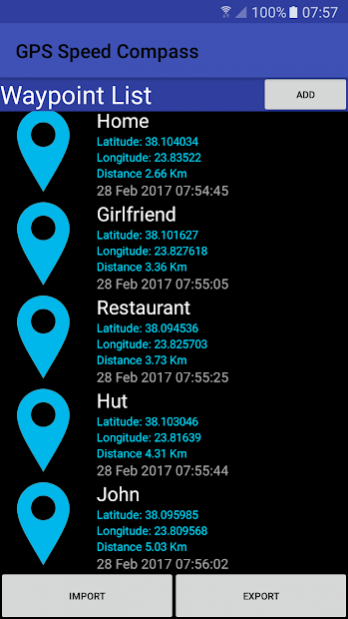


GPS Compass Speedometer Lite knows your heading, location, track distance, ETA etc. and can navigate you to saved waypoints easily. The power of this app is that you get almost all the functionality and information in one screen. This makes it easy to use while driving for example. To save more than 5 waypoints and have the ability to import waypoints from a tag delimited file please buy the Pro version (New lower price).
GPS Compass Speedometer Lite provides:
- Compass heading. Magnetic or GPS mode.
- Arrow showing bearing to destination.
- Current, average and maximum speed.
- Track distance which is the traveled distance since last reset.
- Elapsed time since last reset.
- ETA (Expected Time of Arrival) and remaining time to reach destination.
- Distance i.e. remaining distance to destination.
- Current position in Latitude-Longitude decimal format.
- Current Date and Time as well as Sunrise and Sunset times.
- Address at current location.
- Option to switch between Metric and Imperial units.
- Ability to save up to 5 waypoints and navigate to them.
- Ability to navigate to a point selected on a map.
Short manual
------------------
'+' Button
Press: Add Waypoint to list (up to 5 waypoints. Get the Pro version for more)
Long press: Mark current location as home
Arrow Button
Press: Open Waypoints to select destination etc.
Long press: Navigate to home
Middle Button
Press: Swap between magnetic and GPS heading
Long press: Listen to 'Thank you'
'R' Button
Press: Reset Max Speed
Long press: Reset Track and Time
Wheel Button
Press: Swap between Metric/Imperial units
Long press: Turn 'Moving Away' announcement ON/OFF
If your clipboard supports the 'Share' function as in newer phones you can navigate to any location by sharing Lat, Long as text:
-Select the Lat,Long text
-Tap 'Share' and choose the GPS Compass Speed Lite icon
NOTE: Import and export is through waypoints.txt in the following folder,
Storage/Android/data/com.existon.gpscompasslite/files/data/GPSSpeedCompass/waypoints.txt
If you uninstall the app this file will be deleted so please backup beforehand.
If you don't find this folder browse to it with a USB cable using a computer.
About GPS Compass Speedometer Lite
The company that develops GPS Compass Speedometer Lite is existon.gr. The latest version released by its developer is 1.55.
To install GPS Compass Speedometer Lite on your Android device, just click the green Continue To App button above to start the installation process. The app is listed on our website since 2022-05-10 and was downloaded 0 times. We have already checked if the download link is safe, however for your own protection we recommend that you scan the downloaded app with your antivirus. Your antivirus may detect the GPS Compass Speedometer Lite as malware as malware if the download link to com.existon.gpscompasslite is broken.
How to install GPS Compass Speedometer Lite on your Android device:
- Click on the Continue To App button on our website. This will redirect you to Google Play.
- Once the GPS Compass Speedometer Lite is shown in the Google Play listing of your Android device, you can start its download and installation. Tap on the Install button located below the search bar and to the right of the app icon.
- A pop-up window with the permissions required by GPS Compass Speedometer Lite will be shown. Click on Accept to continue the process.
- GPS Compass Speedometer Lite will be downloaded onto your device, displaying a progress. Once the download completes, the installation will start and you'll get a notification after the installation is finished.
Program Details
System requirements
Download information
Pricing
Version History
version 1.55
posted on 2022-05-10
Great navigator
version 1.54
posted on 2022-03-19
Some improvements
Get the PRO version for even supersonic speeds and 1800km/h scale.
version 1.52
posted on 2019-08-02
Some improvements
Updates for new Android compatibility
Get the PRO version for even supersonic speeds and 1800kmh scale.
Disclaimer
External Download
We do not host GPS Compass Speedometer Lite on our servers. We did not scan it for viruses, adware, spyware or other type of malware. This app is hosted by Galad and passed their terms and conditions to be listed there. We recommend caution when installing it.
The APK Download link for GPS Compass Speedometer Lite is provided to you by apps112.com without any warranties, representations or guarantees of any kind, so access it at your own risk.
If you have questions regarding this particular app contact the publisher directly. For questions about the functionalities of apps112.com contact us.
